Fetching one transcript is a pleasant exercise. Fetching three hundred is an operational problem, and it tends to arrive without warning: a course archive that needs to be searchable by Friday, a research project that has collected a year of videos from one channel, a content audit of everything a company has ever published. A loop that requests the videos one at a time will work, after a fashion, until the fortieth video fails and takes the rest of the run down with it.
This article shows a better shape for the problem. We send the whole list in a single request, let the service run each link as its own job, and then collect the results, retrying only the ones that failed. The examples use Node.js 18 or later, whose built in fetch means there are no dependencies to install. I work on Transcript Dock, whose batch endpoint we use throughout. Batches of ten, twenty five and fifty links are available on the Starter, Pro and Scale plans; the free plan accepts one link per batch, which is enough to try the code but not to enjoy it.
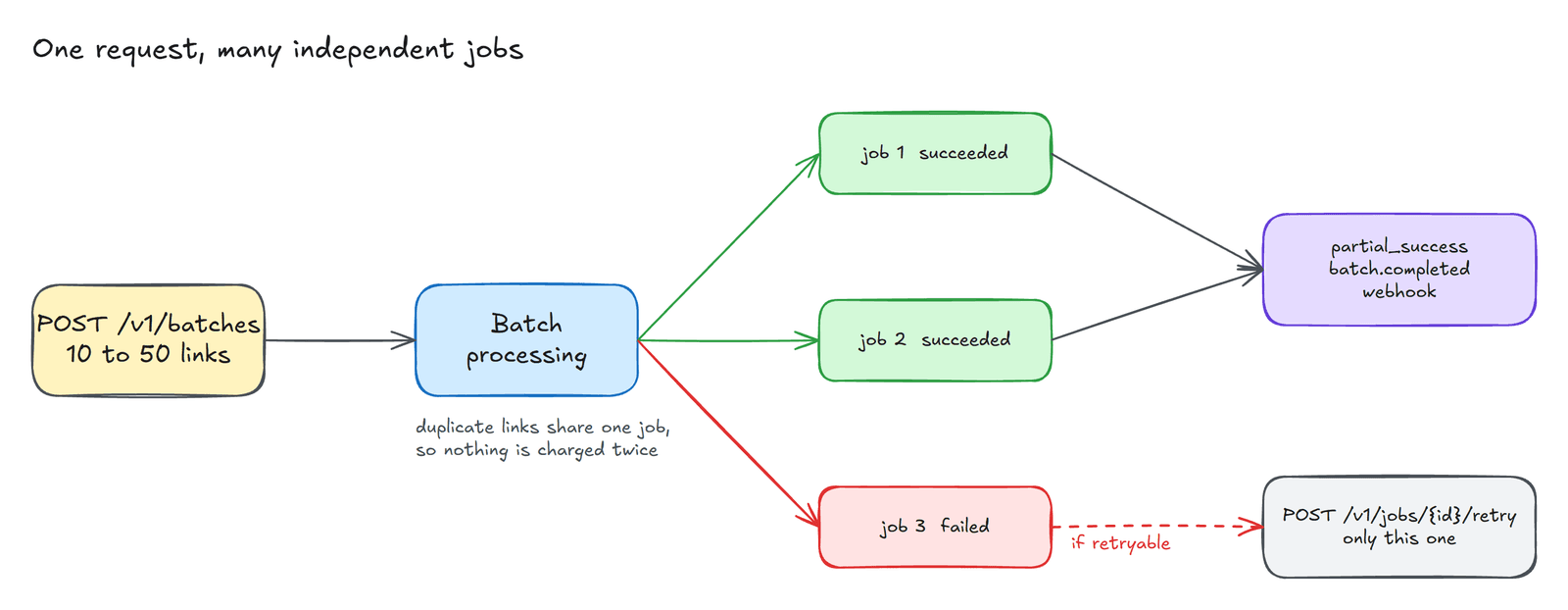
Why each link becomes its own job#
The central idea, shown in the diagram, is that a batch is not one large task but a collection of small ones. Each link becomes a separate job with its own status and its own result. A private video or a missing caption track therefore spoils exactly one item, not the whole run, and the batch as a whole reports partial_success rather than failure. This is the property that makes long lists manageable, and it is worth designing your own code around it.
Submitting the batch#
Keep the key in an environment variable, as before.
export TRANSCRIPTDOCK_API_KEY="td_live_..."
The request body is simply a list of the same job descriptions that the single job endpoint accepts.
const API = "https://www.transcriptdock.com/v1";const headers = {Authorization: `Bearer ${process.env.TRANSCRIPTDOCK_API_KEY}`,"Content-Type": "application/json",};const urls = ["https://www.youtube.com/watch?v=wQKfWMQ5c5E","https://www.youtube.com/watch?v=BntIinjPNRw","https://www.youtube.com/watch?v=Mtw0yV6ZOpc",];const res = await fetch(`${API}/batches`, {method: "POST",// Reuse the same key if you retry this exact request, so it is not submitted twice.headers: { ...headers, "Idempotency-Key": crypto.randomUUID() },body: JSON.stringify({items: urls.map((url) => ({ source: { url }, mode: "captions_only" })),}),});if (!res.ok) throw new Error(`${res.status} ${await res.text()}`);let batch = await res.json();console.log("batch", batch.id, batch.total_items, "items");
Two details are easy to miss. The Idempotency-Key header protects you from submitting the same batch twice if a response is lost on the network; the server recognises a repeated key and returns the original batch. And if the same link appears twice in your list, both items share a single job, so you are not charged for it twice.
Waiting for the batch to finish#
The batch reports an overall status that summarises its jobs. It starts as queued or processing and finishes as succeeded, partial_success, failed or cancelled.
const FINAL = new Set(["succeeded", "partial_success", "failed", "cancelled"]);const sleep = (ms) => new Promise((r) => setTimeout(r, ms));while (!FINAL.has(batch.status)) {await sleep(3000);batch = await (await fetch(`${API}/batches/${batch.id}`, { headers })).json();console.log(`${batch.succeeded_items + batch.failed_items}/${batch.total_items} done`);}
Polling every few seconds is fine for a script you are watching. For anything that runs unattended, a webhook is the more civilised arrangement. Register an endpoint once, pass its identifier as webhook_endpoint_id when you create the batch, and the service will send a signed batch.completed event when the last job finishes, so that your program can sleep until there is something to do.
Collecting the transcripts#
Each item in the finished batch names its job. For every job that succeeded, we read the transcript and write it to a file.
import { writeFile } from "node:fs/promises";for (const item of batch.items) {const job = await (await fetch(`${API}/jobs/${item.job_id}`, { headers })).json();if (job.status !== "succeeded") {console.warn(`item ${item.item_index}: ${job.error?.code}`);continue;}const t = await (await fetch(`${API}/transcripts/${job.result_id}`, { headers })).json();await writeFile(`transcript-${t.source.media_id}.txt`, t.text, "utf8");}
When I ran this against a NASA Goddard video, the file it produced began with a note that music plays throughout, followed, appropriately enough, by the words "Orbiting objects make gravitational waves."
Retrying only what failed#
A failed job tells you whether a retry could help through error.retryable. When it can, retry that job alone rather than resubmitting the whole batch.
await fetch(`${API}/jobs/${job.id}/retry`, {method: "POST",headers: { ...headers, "Idempotency-Key": crypto.randomUUID() },body: "{}",});
Some failures are not worth retrying in that form. A private video, reported as SOURCE_PRIVATE, will stay private however often you ask. A video without captions, reported as NO_CAPTIONS, can be submitted again with mode: "auto" on a paid plan, which transcribes the audio instead.
What it costs#
Each caption transcript costs one credit. Reading a transcript, and exporting it as text, JSON, SRT or VTT, costs nothing further, and neither does fetching a video that your workspace has already transcribed. A failed job releases its reserved credit in full.
Without writing code#
The dashboard has a Batches page that does all of this by hand: paste as many links as your plan allows, one to a line, and watch them finish. The quickstart covers batches, jobs and webhooks in more detail.
Created with the help of AI.